----------------------------------------------------------------------
【Voltage Compatibility】
When using electrical appliances, please note that they are designed for Japanese voltage specifications (90-110V), so if you use them with a different voltage, it may cause a malfunction.
【Plug Type】
Our products use Japanese plug types (A or B type).
Please use a conversion adapter if necessary.
【Important Note on Transformers and Adapters】
A transformer adjusts voltage to match your device’s requirements.
A conversion adapter only changes the plug shape and does not adjust voltage.
Using only a conversion adapter without a transformer may result in damage to the product.
【Liability】
We are not responsible for malfunctions or damages caused by improper use, such as operating the product without a transformer.
----------------------------------------------------------------------
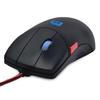
[Macro Definition Button] Each button can also be set to a key on the keyboard that you usually use. By setting keys that are frequently used when creating documents, such as Shift, Alt, and Ctrl, tasks such as copying and pasting can be performed more smoothly than typing on the keyboard.
[Improve work efficiency] The 5-button mouse is recommended for people who need to do quick and detailed work such as CAD 3D and graphic design production, internet searches, etc. Unlike the three buttons for left and right and scroll, there are additional buttons for forward and backward pages, greatly increasing work efficiency.
[Adjustable DPI] The DPI (dot density) that moves the cursor can be adjusted in 3 levels: 800, 1200, and 1600, and you can choose it depending on the accuracy of your work and your own sense. You can also tell which DPI you are using by looking at the color of the light on the sensor on the back of the mouse.
[Ergonomic design and ease of use] The sophisticated finish and rubber grip provide a comfortable feel in your hand. Light construction allows for long-term use without tiring your hands. The scroll wheel is separate from the middle button and does not interfere with middle button operation. A 5-button mouse with a 3-button feel that is easy to use with 3DCG and CAD.
[After-sales service] We hope that our customers have a pleasant shopping experience. If you have any problems with the product, please feel free to contact the store.
Specifications: Green LED optical mouse Interface: Number of buttons: 5, Wheel: 1, Resolution: 800, 1200, 1600DPI (switchable with rear switch) Windows: Compatible OS: Windows 10/Windows 8/Windows 7 Macintosh: Compatible OS: MacOS By default, pressing the scroll button becomes the 4th (back) button, and the red button near the thumb becomes the 5th (forward) button.